Why Your Zoom Calls Freeze Even When Your Internet Speed Test Looks Fine
By Nexxis, Inc.
August 5, 2026
You’re twelve minutes into a video call with a prospect. Their face freezes mid-sentence. You wait. It unfreezes. Somebody says “sorry, you cut out there” and you both restart the thought.
So you run a speed test on your internet service. Results: 300 Mbps down; maybe even 300 Mbps up. Everything looks great.
That result is why this problem goes unsolved in so many offices. The speed test says the internet is fine, so the conversation moves on to blaming Zoom (or a similar video conference provider), or the laptop, or the Wi-Fi. Usually none of those is the culprit.
The real answer is that a speed test measures the one thing your video calls don’t actually need.
Speed is capacity. Video calls need consistency.
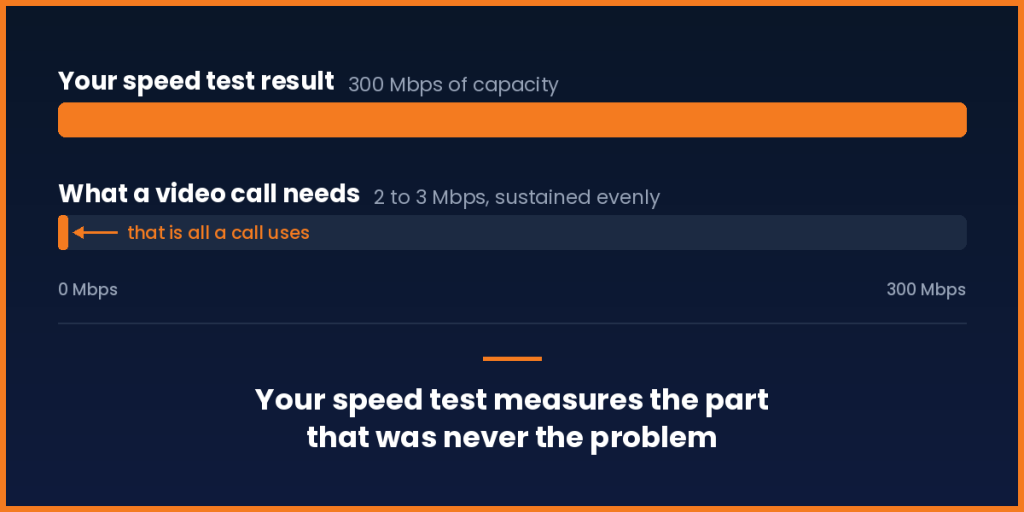
A high-definition video call uses somewhere around 2 to 3 Mbps.
Read that again next to your speed test result. If you’re paying for 300 Mbps, a video call is using about one percent of it. You could run thirty simultaneous calls and still not run out of room.
Bandwidth was never the problem. You have plenty.
Think of it like a supermarket. Bandwidth is how many checkout lanes are open. That matters if you’re moving a huge cart of groceries — a big file transfer, a backup job. But a video call isn’t a big cart. It’s one item, and you need to get through right now, and you need to do it again a fraction of a second later, and again, thousands of times over the length of the call.
What ruins that isn’t how many lanes exist. It’s the unpredictable wait.
The three things that actually break calls
Latency — how long a piece of data takes to get where it’s going. Some delay is unavoidable. Too much and people start talking over each other, because the natural rhythm of conversation falls apart.
Jitter — the inconsistency of that delay. This is the freeze. Video and voice arrive as a steady stream of small packets, and they need to arrive evenly spaced. When they arrive in bursts and gaps, the software has to guess what to display. Frozen frame, garbled audio, the robotic voice everyone recognizes.
Packet loss — data that never arrives at all. Some loss is normal and gets covered up. Enough of it and you get the dropouts.
None of these three shows up on a speed test. If you want the fuller breakdown of what each one does across your business — cloud apps, backups, customer support, file sharing — we covered that in how packet loss, latency, and jitter affect your business.
Why the test misses it
A speed test grabs as much data as it can, from a nearby server, for about fifteen seconds, and reports the peak.
That’s four things working in its favor at once. It’s a short window, so it misses intermittent problems. It’s a nearby server, so it doesn’t reflect the actual distance to your applications. It’s measuring peak throughput, not steadiness. And you almost always run it after the problem happens — by which point the connection has often recovered.
You’re testing whether the road is wide. The complaint is that traffic keeps stopping.
So why is the connection inconsistent?
A few common causes, and they’re rarely the ones people guess:
You’re sharing. Most standard business internet access, especially from cable providers, is shared with everyone else on your local segment. At 2 p.m. on a Tuesday, that’s quiet. At 4:30 when the neighborhood comes online, it isn’t. Your capacity didn’t change — your consistency did.
Everything competes equally. By default your connection doesn’t know the difference between a live customer call, a cloud backup, or a big file sync. It treats them the same. So the backup that kicks off at 3 p.m. and the sales call at 3 p.m. fight for the same space, and the call loses, because the backup doesn’t care about arriving on time and the call does.
There’s only one path. When your single connection has a bad ten minutes, there’s nowhere else for the traffic to go. It waits it out. So do you.
The problem is upstream. You can have a perfect connection into the building and still hit congestion two or three networks away, on a route you don’t control and can’t see.
What actually fixes it
Measure the right things. Ask your provider for continuous monitoring of latency, jitter, and packet loss — not a speed test. A single spot check tells you almost nothing about a problem that comes and goes.
Prioritize real-time traffic. Voice and video should get right of way over backups and file syncs automatically, without anyone scheduling around it. This is a configuration decision, not a hardware purchase — it’s what automatic prioritization of voice, video, and data is built to handle.
Have more than one path — and use it intelligently. A second connection helps only if traffic can move to it the moment the first one degrades. Not when it fails completely. Degrades. By the time a line is fully down, your call died several minutes ago. And the switch has to be invisible to your applications, which is the job Same-IP Auto-Failover does — your connection keeps the same address, so the call never notices it moved.
That last distinction is the one worth holding onto. Most redundancy setups only react to total failure. The calls that freeze are being ruined by a connection that never technically went down at all.
The short version
If your calls freeze but your speed test looks great, stop looking at speed. You don’t have a capacity problem. You have a consistency problem, and they have completely different fixes.
About Nexxis
Smart ConNEXion® was built for exactly this gap. Instead of one shared line, it runs multiple carriers and multiple circuits into your business, with FailSafe® SD-WAN watching quality continuously and moving live voice and video onto a healthy path the moment one starts to degrade — not after it fails.
And if your phones run over that same connection, our Complete Voice & Data solution puts internet and voice under one provider — one agreement, one invoice, one number to call. No two vendors pointing at each other while your calls keep dropping.
If your team has been quietly working around freezing calls, we can tell you what’s actually happening on your connection. Schedule a call or reach us at 1-888-7-NEXXIS.